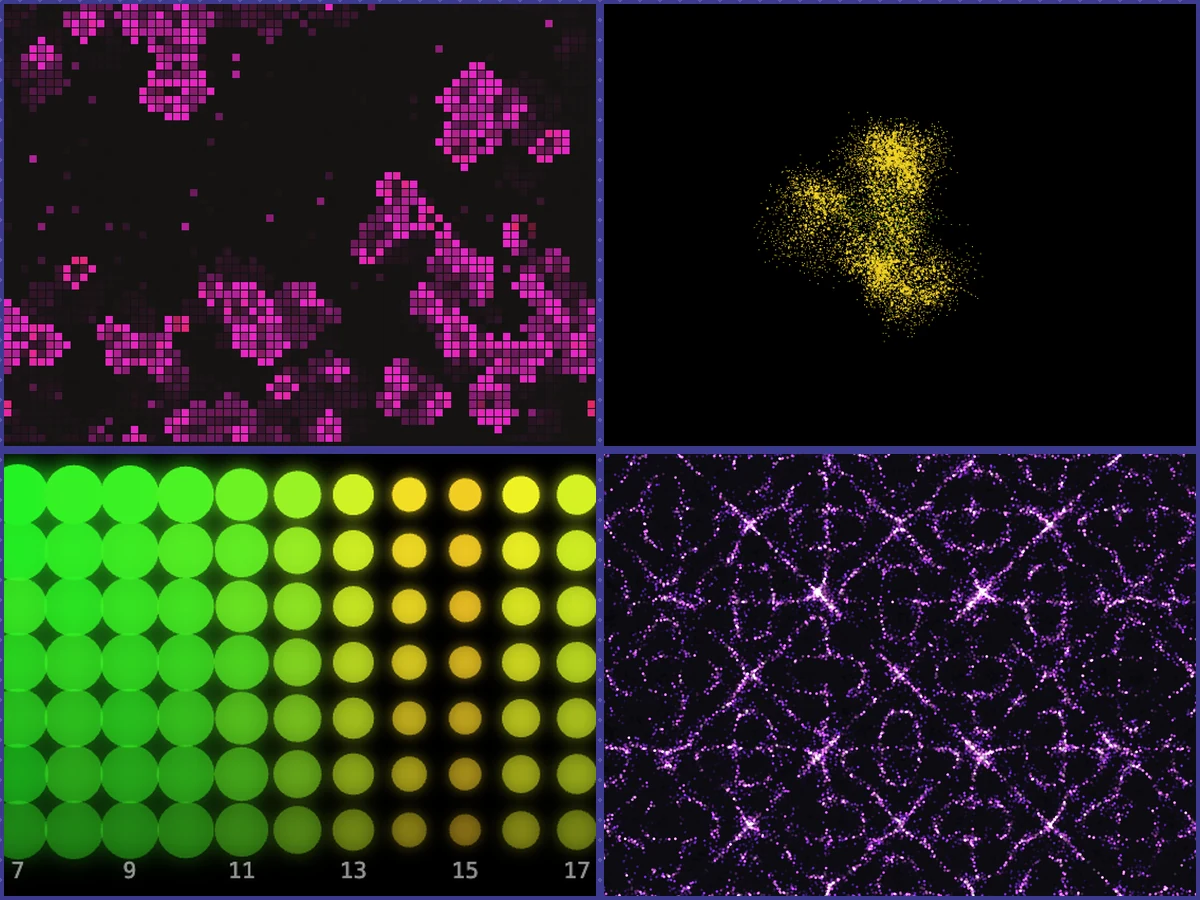
Five sketches that only listen. Talk, sing, clap, or play a synth into the mic, and a cellular automaton, a slime mold colony, a spectrum heatmap, a Chladni sand pattern, and a live neural network all bend to whatever you're making right now, no toggles or presets involved. The full build runs all five off one shared mic feed, with MIDI plugged in and every session recordable.
My Role
Designer & Developer
Timeline
4 Weeks
Platform
Browser (desktop & mobile)
Stack
p5.js, p5.sound, Web Audio API, Web MIDI API, Canvas
Overview
This started because I got a MIDI controller and fell into producing my own music. Once I had real tracks to sit with, I wanted a way to watch them as much as hear them. I'd seen generative art built in p5.js before and loved how alive it looked, so I set out to make art that actually listens: the sound itself decides what shows up on screen, with no preset or manual animation cue steering it. Underneath that was a broader itch I'd had for a while, to build something that actually earned the phrase "art and technology" instead of using one to dress up the other.
That turned into five sketches, each translating the same live audio into a different visual language. A cellular automaton, a slime mold colony, a scrolling spectrum heatmap, a Chladni sand pattern, and eventually a live neural network. Later I plugged my MIDI controller in directly as a second live input, so playing a track and watching it unfold finally happened in the same gesture. Now it's basically my own personal art installation. I pull it up whenever I'm producing, or just want a low-key way to sit with music.
The Sketches
These are some views recorded live from an actual session. Click through and try them yourself!
The mechanics behind the rule, for anyone curious: the mic feeds p5.FFT and p5.Amplitude once per frame, which split the incoming sound into bass, mid, and treble bands plus a volume reading. Those four numbers are the entire control surface, and each sketch maps them differently: bass triggers events like a cell birth or a firing neuron, treble and mid steer color, volume drives speed or intensity.
Mic in, four numbers out, five different opinions about what those numbers should look like.
Getting a usable signal out of a laptop mic took more fiddling than I expected. Browsers auto-apply AGC and noise suppression by default, which flattens loud and quiet toward the same level, so I turn both off and boost the naturally quiet input with an explicit gain stage instead.
The photobooth build, where all five sketches run at once, rebuilds each one as a p5 instance-mode factory reading off a single shared audio object, one mic, analyzer, MIDI synth, and recorder shared across the board. That's what lets all five run and record together, no juggling five separate browser tabs. MIDI plugs in there as a second live input, too: a controller's notes play a shared synth mixed into the analyzed signal, and its knobs shape tone and steer Slime Mold's growth in real time.
Clicking a tile to zoom into one sketch is pure CSS, no canvas resize or reinit involved. Each canvas already renders at a fixed resolution, so focusing one just scales its display size up; the sketch underneath never notices. That was the difference between the switch feeling instant and it stuttering every time.
Every sketch shares one theme file so the collection reads as one thing instead of five disconnected demos, and there's no build step. Each page is self-contained, pulling p5.js and p5.sound straight from a CDN, so opening the file is enough to run it. The whole thing is public, sketches included: the code's on GitHub if you want to see how any of it actually works.
Working without manual controls flips the whole design question. It stops being "what should the user get to adjust" and becomes "what does this number already mean, and where does it belong." Bass ended up meaning birth, which sounds obvious in hindsight, but I spent an embarrassing amount of time just staring at the cellular automaton before that clicked. Chasing mappings that felt inevitable instead of arbitrary was basically the entire project.
The resonance field sketch is the one I'm proudest of. It's a genuine, if simplified, Chladni-plate simulation, so the sound isn't nudging the pattern along. It's the reason the pattern exists at all. That's the closest I got to the actual spirit of what I was trying to make.
Adding MIDI later put the same rule through a harder test. A knob is technically a slider, but turning one live while a note is still ringing feels like part of the performance itself. Rebuilding all five sketches to share one audio graph was the unglamorous half of that work, but it's the difference between five separate browser tabs and one actual instrument.
Next up: I want to keep growing the garden with a few more art styles, more visual languages for the same live audio to speak through.
Live · all 5 pieces
Try the full photobooth
The embeds above are the real sketches running live, no screenshots. Open the full build and all five run together off one mic feed, MIDI plugs in, and you can record whatever you make.